IPC 检查器
CefIpcInspector 是一个内置开发调试覆盖层,用于查看某个 CefTexture 的 Godot 与 CEF 渲染进程之间的 IPC 消息。
它可以帮助你快速确认:
- 双向 IPC 是否正常流动
- 当前使用的是哪条通道(
text/binary/data) - 消息预览内容和字节大小
- 消息时序和到达顺序
演示视频
可用性
出于安全考虑,IPC 检查器仅在以下场景启用:
- Godot 为调试构建(
OS.is_debug_build() == true),或 - 从编辑器运行(
Engine.is_editor_hint() == true)
在发布版中,检查器 UI 不会初始化。
快速开始
- 在场景中同时添加
CefTexture和CefIpcInspector。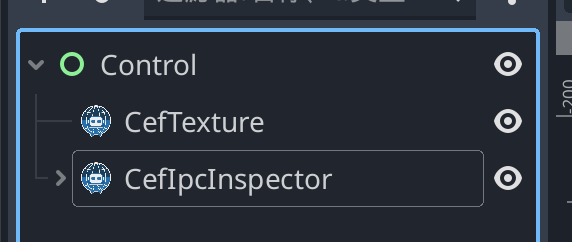
- 在 Inspector 面板中,把
CefTexture节点拖到target_cef_texture属性上。 - 以编辑器运行或 Debug 模式运行场景。
- 点击右下角
IPC Inspector按钮展开面板。
绑定完成后会立即开始监听 IPC 消息。
面板功能
All / Incoming / Outgoing按方向筛选消息Clear清空当前历史Show more / Show less展开或折叠长消息- 历史最多保留
500条(超出后最旧消息会被丢弃)
debug_ipc_message 事件结构
检查器内部监听 CefTexture.debug_ipc_message(event: Variant),其中 event 为 Dictionary:
| 字段 | 类型 | 说明 |
|---|---|---|
direction | String | to_renderer 或 to_godot |
lane | String | text、binary、data |
body | String | 消息预览(binary 通道以十六进制预览显示) |
timestamp_unix_ms | int | Unix 毫秒时间戳 |
body_size_bytes | int | 原始负载字节数 |
常见问题
- 面板始终不出现:
- 确认当前是 Debug 构建或编辑器运行模式。
- 显示
Assign target_cef_texture to a CefTexture node.:- 需要把
target_cef_texture指向实际浏览器节点。
- 需要把
- 没有任何消息:
- 确认消息确实被发送,并检查当前筛选条件。 你也可以通过 Chrome DevTools 的 REPL 快速发送测试消息。
- 大消息缺失:
- 超过安全上限的 IPC Data 负载会被丢弃并输出日志。