IPC Inspector
CefIpcInspector is a built-in developer overlay for inspecting IPC traffic between Godot and CEF renderer processes for a specific CefTexture.
It helps you verify:
- Whether IPC is flowing in both directions
- Which lane is used (
text,binary,data) - The actual payload preview and byte size
- Message order and timing
Demo Video
Availability
For safety, IPC inspector is only enabled when:
- Godot runs in debug mode (
OS.is_debug_build() == true), or - Running from the editor (
Engine.is_editor_hint() == true)
In release builds, the inspector UI is not initialized.
Quick Start
- Add both
CefTextureandCefIpcInspectorto your scene.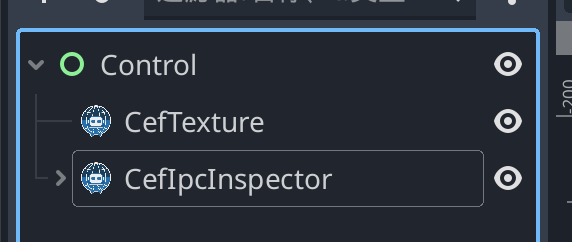
- In the Inspector panel, drag your
CefTexturenode intotarget_cef_texture. - Run the scene in editor/debug mode.
- Click
IPC Inspectorin the bottom-right corner to open the panel.
The inspector will start listening immediately after the target is assigned.
Panel Features
All / Incoming / Outgoingfilter by message directionClearresets the current historyShow more / Show lessexpands long payloads- Maximum history is
500messages (oldest entries are dropped first)
debug_ipc_message Payload
The inspector internally listens to CefTexture.debug_ipc_message(event: Variant) where event is a Dictionary:
| Key | Type | Description |
|---|---|---|
direction | String | to_renderer or to_godot |
lane | String | text, binary, or data |
body | String | Payload preview (binary is shown as hex preview) |
timestamp_unix_ms | int | Unix timestamp in milliseconds |
body_size_bytes | int | Original payload size in bytes |
Troubleshooting
- Panel never appears:
- Confirm you are in debug build or editor run mode.
Assign target_cef_texture to a CefTexture node.:- Set
target_cef_textureto the actual browser node.
- Set
- No messages shown:
- Confirm messages are sent, and check the current direction filter. You can also send quick test messages from the Chrome DevTools REPL.
- Missing large data messages:
- Oversized IPC data payloads can be dropped by safety limits and logged.